
Visual query builder
- PostgreSQL
- MySQL
- MariaDB
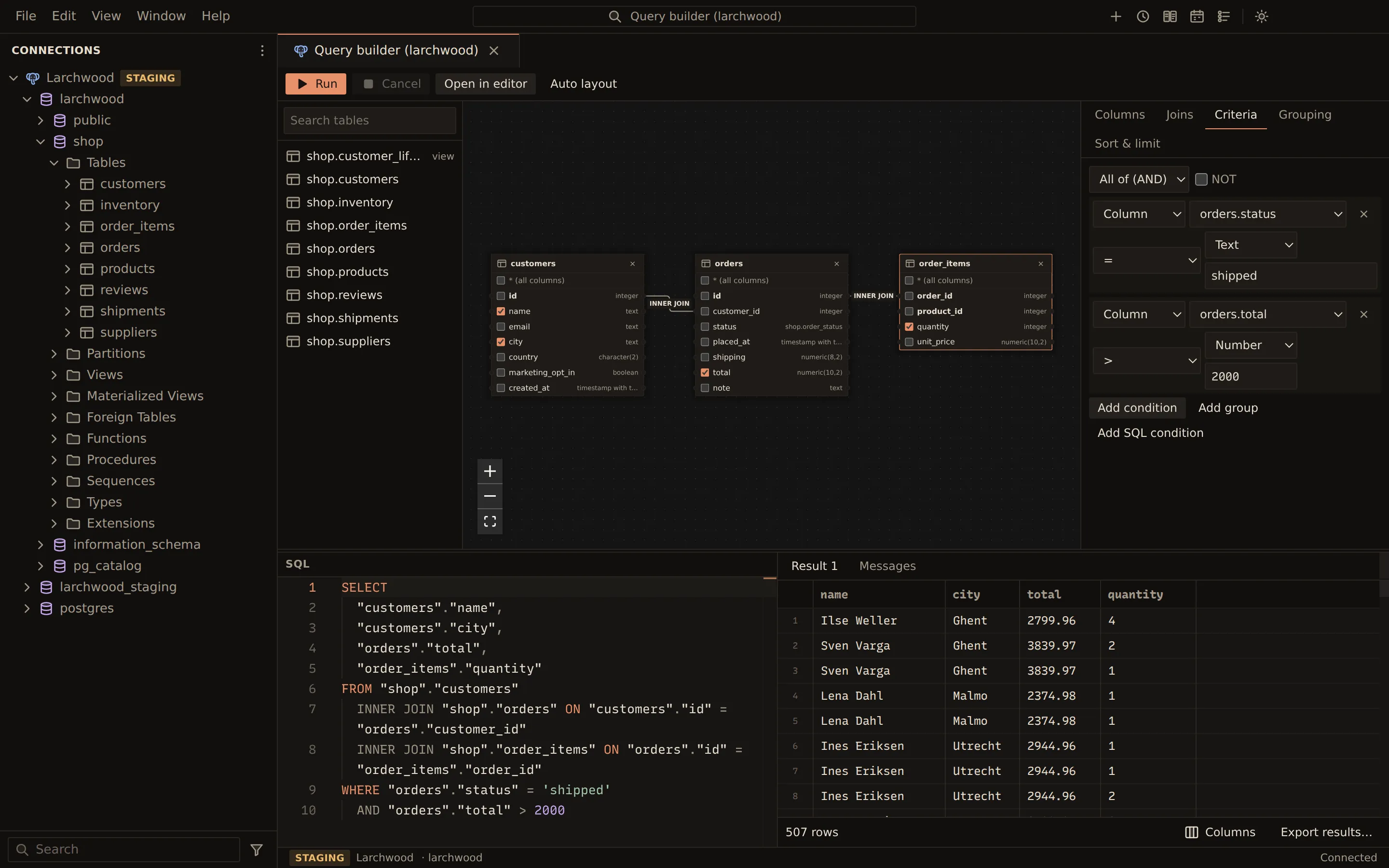
The visual query builder writes a SELECT for you. Put tables on a canvas, tick the columns you
want, and set criteria, grouping, sort and limit in the side panels. The SQL pane under the
canvas shows the query as you build it, and an edit to the SQL updates the builder. Runs go
through the same path as a query tab, with its safety checks, streaming results and history.
Open a builder
Section titled “Open a builder”Right-click a connection, a database or a PostgreSQL schema in the sidebar (or use its Actions button) and choose New query builder. The builder works on that database, and its footer shows the connection and database.
To start from SQL you already have, put the cursor in a statement in a query tab, or select it, and choose Open in query builder in the toolbar. Open in Query Builder is also in the editor’s right-click menu.
Build a query
Section titled “Build a query”- Find a table with Search tables in the list on the left. Click it to add it to the query, or drag it onto the canvas.
- Add a second table. When the two tables are related by a foreign key, the builder proposes an
INNER JOINon it, drawn as a line between the boxes. - Tick the columns you want on the table boxes. With no columns ticked, the query selects every
column (
*). - Set criteria, grouping and sort in the side panels (see below).
- Choose Run, or press Ctrl + Enter (Cmd on macOS) in the SQL pane. The results appear beside the SQL.
To join two columns yourself, drag from a column on one box to a column on another. Auto layout arranges the tables on the canvas, related tables side by side.
SELECT "customers"."name", "orders"."total"FROM "shop"."customers" INNER JOIN "shop"."orders" ON "customers"."id" = "orders"."customer_id"WHERE "orders"."total" > 10ORDER BY "orders"."total" DESCMySQL and MariaDB tables are qualified with their database, PostgreSQL tables with their schema.
Side panels
Section titled “Side panels”| Panel | What you set |
|---|---|
| Columns | Table aliases; the select list with Add column, Add aggregate and Add expression; column aliases; Distinct rows (SELECT DISTINCT) |
| Joins | Each join’s type (Inner join, Left join, Right join, Full join), its column conditions, swapping its sides; Add join between two tables |
| Criteria | WHERE conditions: Add condition, Add group, Add SQL condition; groups match All of (AND) or Any of (OR) and can be negated with NOT |
| Grouping | GROUP BY with Add grouping or Group by the selected columns, and HAVING conditions |
| Sort & limit | ORDER BY with Add sort and a direction; Nulls first or Nulls last on PostgreSQL; Limit and Offset |
Conditions compare a column with a value using =, <>, <, <=, >, >=, LIKE,
NOT LIKE, IN, NOT IN, BETWEEN, NOT BETWEEN, IS NULL and IS NOT NULL, plus ILIKE
and NOT ILIKE on PostgreSQL. An SQL condition or expression must be one complete expression:
no ;, no comments, no subquery.
Everything you can do on the canvas is also a labelled control in the side panels. Problems, such as an unfinished condition, are listed over the canvas; Run is disabled while one blocks the query, with the reason in its tooltip.
Edit the SQL
Section titled “Edit the SQL”Type in the SQL pane and, after a short pause, the builder follows: tables, joins, columns, criteria, grouping and sort update to match. Autocomplete works in the SQL pane.
When the SQL uses something the builder cannot show, the builder turns read-only with a note
naming the construct, for example a WITH clause, UNION, a subquery, a window function or
several statements. The SQL still runs as written. Choose Back to the builder’s query to
return to the last query the builder could show, or edit the SQL back to what it can show.
While the SQL does not parse yet, the builder keeps showing the last query it could read.
Functions, arithmetic and CASE stay as written expressions, and predicates the builder does not
model become SQL conditions, so ordinary queries still open in it. SQL you type is kept as typed
until you change the query in the builder; then the builder writes its own formatting and
comments are not kept.
Run and continue in the editor
Section titled “Run and continue in the editor”Run uses the query tab path: the write-safety checks, parameter prompts, results streamed 1,000 rows at a time with Fetch more, Cancel, and history. See Query editor and Results grid.
Choose Open in editor to copy the SQL into a new query tab on the same database.
Related
Section titled “Related”Documents Querybara 0.1.1 · built frombc9f5aa