
Test Connection
- PostgreSQL
- MySQL
- MariaDB
- MongoDB
- Redis / Valkey
- Elasticsearch
- CLI
Test Connection checks a profile one step at a time and shows where a connection breaks. It runs on the values in the dialog, so you can test before you save, and it closes everything it opened when it ends.
Run a test
Section titled “Run a test”- Open the connection dialog: New connection in the side bar header’s menu (then choose the engine), or Edit… in a connection’s actions menu.
- Fill in the tabs.
- Choose Test Connection at the bottom of the dialog.
If a field is missing or wrong, the test does not start: the dialog opens the tab that holds the field and puts the cursor in it.
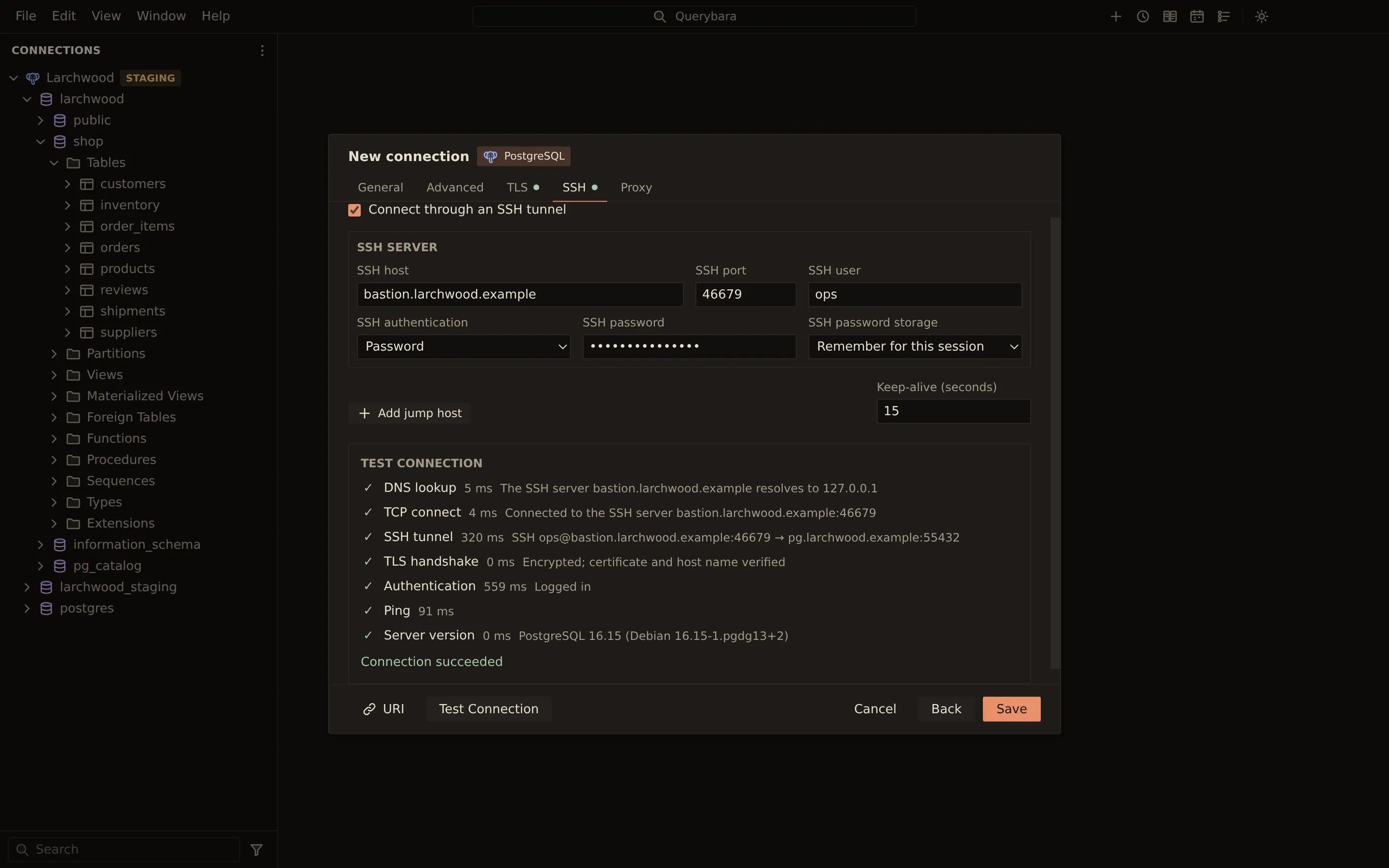
The results appear under the form, in a Test Connection section. The steps appear as they finish, each with ✓ (passed), ✗ (failed) or – (skipped), its duration and a short message. At the end the dialog shows Connection succeeded or Connection failed.
When a step fails, it shows the error and a hint for the fix, and the steps after it are reported as skipped (“Not run: an earlier step failed”).
What each step checks
Section titled “What each step checks”| Step | What it checks |
|---|---|
| DNS lookup | Resolves the host name. Skipped for an IP address or a Unix socket. For MongoDB SRV records, reads the SRV record. |
| TCP connect | Opens a TCP connection (or the Unix socket) and closes it again. For Elasticsearch, one reachable node is enough. |
| SSH tunnel | Opens the SSH tunnel (through any jump hosts) and proves the last hop reaches the database. Labelled Proxy when the profile uses a proxy without SSH. Skipped without either. |
| TLS handshake | Negotiates TLS in the profile’s mode. Skipped when TLS is disabled or for a Unix socket. |
| Authentication | Logs in with the user and secret. For Elasticsearch, sends GET / with the credentials. |
| Ping | Sends a round trip on the open session. For Elasticsearch, reads the cluster health. |
| Server version | Reports the engine and version. MongoDB adds its topology; Elasticsearch adds the distribution, licence and cluster name. |
On success, the TLS step says how much it verified: “Encrypted; certificate and host name verified”, “Encrypted; certificate chain verified (host name not checked)” or “Encrypted; the server certificate is not verified”.
Through an SSH tunnel or a proxy
Section titled “Through an SSH tunnel or a proxy”With a tunnel or proxy, DNS lookup and TCP connect check the first server on the way: the proxy, or the first SSH host. The database host is resolved beyond it. SSH tunnel then opens the tunnel and reports problems such as a wrong password, a rejected key, a missing passphrase, an untrusted or changed host key, a refused forward, or failed proxy authentication. The later steps run through the tunnel.
If Querybara has not seen an SSH server’s host key before, the test stops to ask whether to trust it; see SSH tunnels.
For a MongoDB replica set, Redis Sentinel or Redis Cluster behind a tunnel, the SSH step passes when the first server accepts a connection, and the later steps report the replica set or cluster. See Replica sets, Sentinel and Cluster.
Common fixes
Section titled “Common fixes”- TLS handshake fails on a server without TLS. Many local servers have none. On the TLS tab, set TLS mode to Disable TLS; the result suggests this when the TLS step fails.
- The server accepts only TLS connections. A new connection starts with TLS off, and the TLS handshake step is then skipped. Choose a mode on the TLS tab. See TLS modes.
- DNS lookup fails for a name only the bastion knows. Use an SSH tunnel: the SSH server then resolves the database host.
From the command line
Section titled “From the command line”querybara test runs the same steps for a saved profile or a URI:
querybara test shop-devquerybara test shop-dev --jsonIt exits with 0 when every step passes, 1 when a step fails (with a fix hint) and 2 on other
errors. --json prints the steps as JSON. See querybara test.
Related
Section titled “Related”Documents Querybara 0.1.1 · built frombc9f5aa