
Data transfer
- PostgreSQL
- MySQL
- MariaDB
- MongoDB
- Redis / Valkey
A data transfer copies tables, collections or keys from one connection to another in one streaming job. The data changes shape where the engines differ: SQL rows can become documents with their child rows embedded, and documents can become rows with their arrays in child tables.
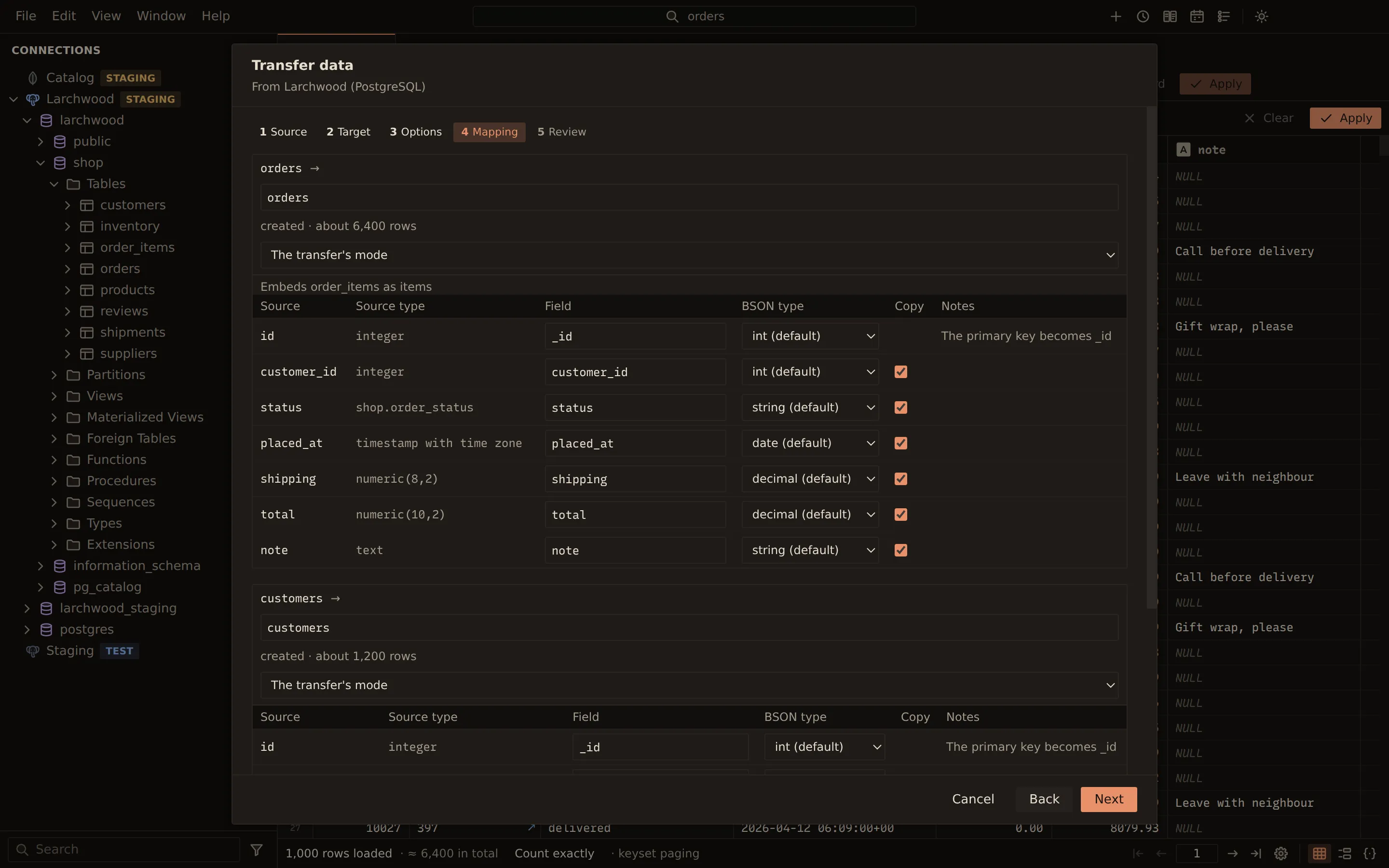
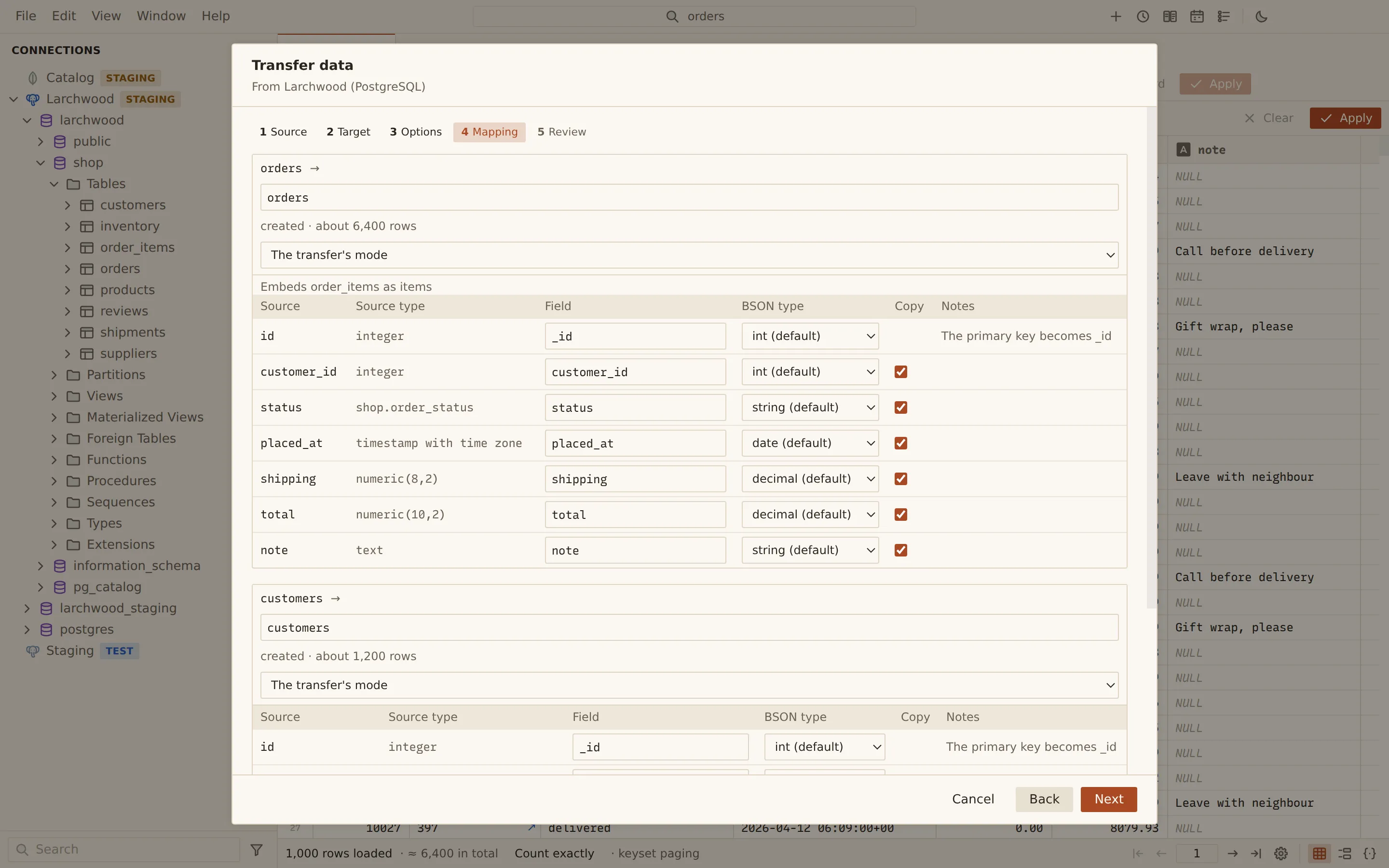
- SQL to MongoDB: each orders row becomes one document.
- Its order_items rows, found through the foreign key, are embedded in the document as an array.
- MongoDB to SQL: nested fields flatten into columns, and an array becomes a child table with a parent key, or a JSON column.
- SQL to SQL across engines: an editable type mapping turns PostgreSQL types into MySQL ones.
- Rows stream first; keys, indexes and foreign keys are added after the data.
- Redis to Redis: each key is DUMPed with its remaining time to live and RESTOREd on the target.
| From | To | How the data lands |
|---|---|---|
| PostgreSQL, MySQL or MariaDB | PostgreSQL, MySQL or MariaDB | Columns get the target engine’s types from an editable mapping; keys, indexes and foreign keys follow |
| PostgreSQL, MySQL or MariaDB | MongoDB | Typed documents; child rows can be embedded as an array through a foreign key |
| MongoDB | PostgreSQL, MySQL or MariaDB | Nested fields flatten to columns; arrays become child tables or JSON columns; types from a sample |
| Redis | Redis | DUMP and RESTORE with each key’s time to live, standalone or Cluster |
Run a transfer
Section titled “Run a transfer”- In the sidebar, right-click a connection, a table or collection, or what holds them (a PostgreSQL schema; a MySQL, MariaDB or MongoDB database), and choose Transfer data to….
- Source: pick the database (and schema on PostgreSQL) and tick the tables or collections, or for Redis enter Key patterns, one per line (* matches any text).
- Target: pick the Connection and Database (and on PostgreSQL the Schema (created when missing)).
- Options: choose what happens when a target table exists, the batch size and error handling (see below).
- Mapping (not for Redis): check each target table and column, and change names and types where you need to.
- Review: read what will be created, and what will be dropped, emptied or overwritten, and the statements before and after the data.
- Choose Transfer.
The transfer runs as a job: follow it, or cancel it, in the Jobs panel. The job runner plans the transfer again on fresh sessions and refuses to run if the plan changed into something you did not confirm.
When the target table exists
Section titled “When the target table exists”| Mode | What it does |
|---|---|
| Create | Creates each table; stops if one exists |
| Drop and create | Drops the tables that exist, then creates them |
| Empty | Empties the tables that exist and creates missing ones |
| Append | Adds rows to the tables that exist, matching names |
The mode can also be set per table on the Mapping step.
Options
Section titled “Options”| Option | Applies to |
|---|---|
| Rows per batch (Keys per batch for Redis) | All |
| Tables at once (Patterns at once for Redis) | All |
| When a row fails: Stop the transfer or Log it and go on | All |
| A transaction per batch | SQL targets |
| Keys, indexes and foreign keys after the data (faster) | SQL targets |
| Turn off foreign key checks and triggers during the load | SQL targets. PostgreSQL needs a superuser; MySQL turns off foreign key checks only |
| Move sequences and AUTO_INCREMENT counters past the copied values | SQL targets |
| A single-column primary key becomes _id | SQL to MongoDB |
| Embed child rows | SQL to MongoDB |
| Documents sampled for the columns and types | MongoDB to SQL |
Replace keys that exist on the target (RESTORE … REPLACE) |
Redis |
| Keep each key’s time to live | Redis |
SQL to SQL
Section titled “SQL to SQL”Each column’s target type comes from a mapping table for the engine pair. The Mapping step shows the source type, the target type it picked and why, and lets you rename a table or column, type a different target type, or untick Copy to leave a column out. The data streams first; with Keys, indexes and foreign keys after the data (faster) ticked, primary keys, indexes and foreign keys are added once the rows are in.
SQL to MongoDB
Section titled “SQL to MongoDB”Under Embed child rows (an array of sub-documents per parent, through a foreign key), every
table with a foreign key to a chosen table is listed. Tick one to embed its rows in the parent’s
documents, and name the array field. For example, order_items rows embedded into each orders
document as an items array.
With A single-column primary key becomes _id ticked, the primary key becomes the document’s
_id.
MongoDB to SQL
Section titled “MongoDB to SQL”Querybara samples the documents to find the fields and their types. On the Mapping step, each nested object field can land as Columns (flattened) or a JSON column, and each array field as a JSON column or a Child table.
Redis to Redis
Section titled “Redis to Redis”Keys are copied with DUMP and RESTORE, keeping their time to live unless you untick Keep
each key’s time to live. Without Replace keys that exist on the target, a key that already
exists on the target is left as it is and counted as skipped. In Cluster mode, keys are scanned on
every primary of the source and restored on the target by hash slot.
From the command line
Section titled “From the command line”querybara transfer runs the same transfers. --dry-run prints the plan, with each column’s type,
and changes nothing.
querybara transfer pg-dev my-dev --table orders --table customersquerybara transfer pg-dev my-dev --all --mode drop-create --yesquerybara transfer my-dev mongo-dev --table orders --embed orders:order_items:order_items_ibfk_1:itemsquerybara transfer mongo-dev pg-dev --table orders --shape orders.items=json --dry-runquerybara transfer redis-a redis-b --pattern "cart:*" --replaceRelated
Section titled “Related”Documents Querybara 0.1.1 · built frombc9f5aa