
Query builder
- Elasticsearch
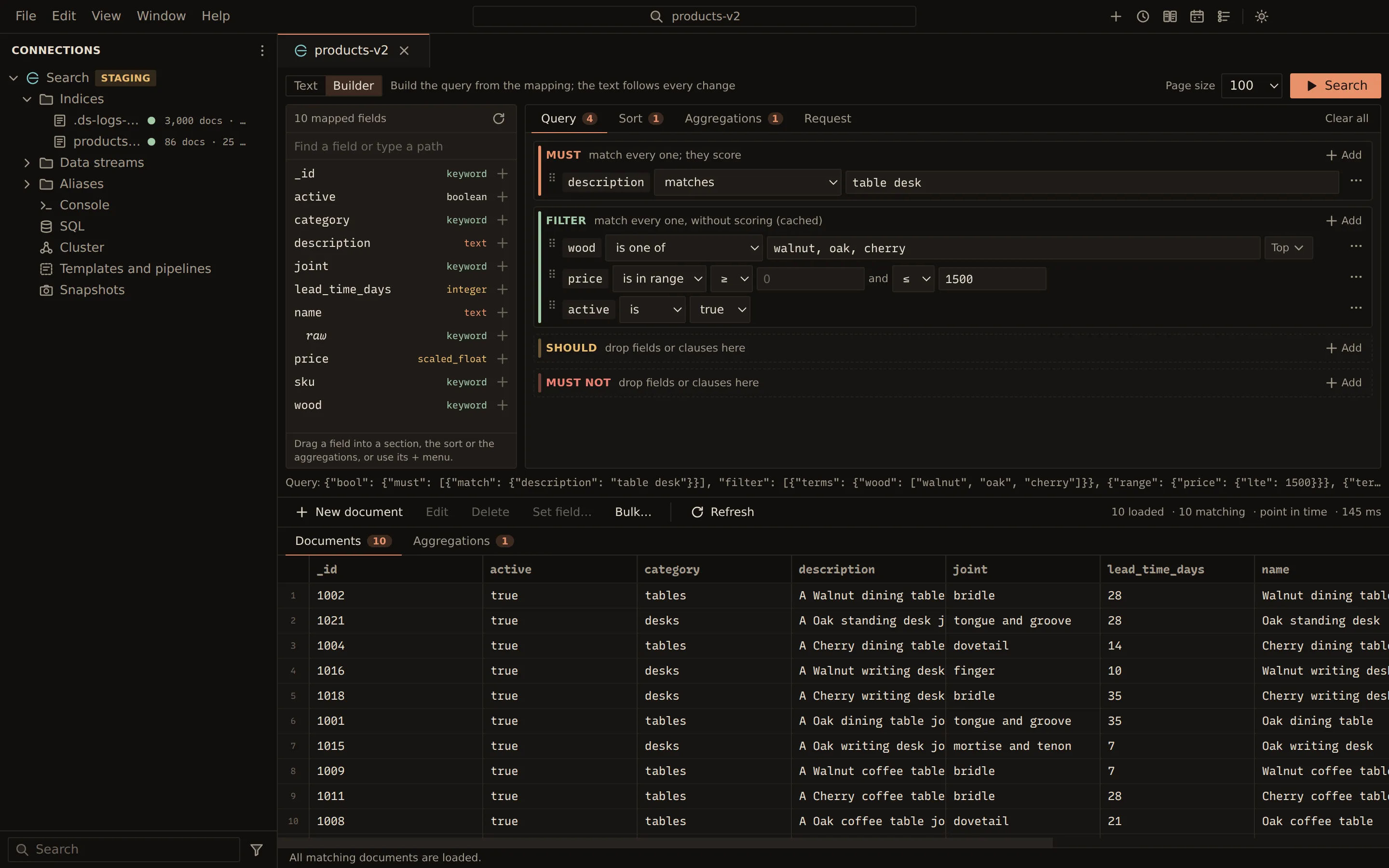
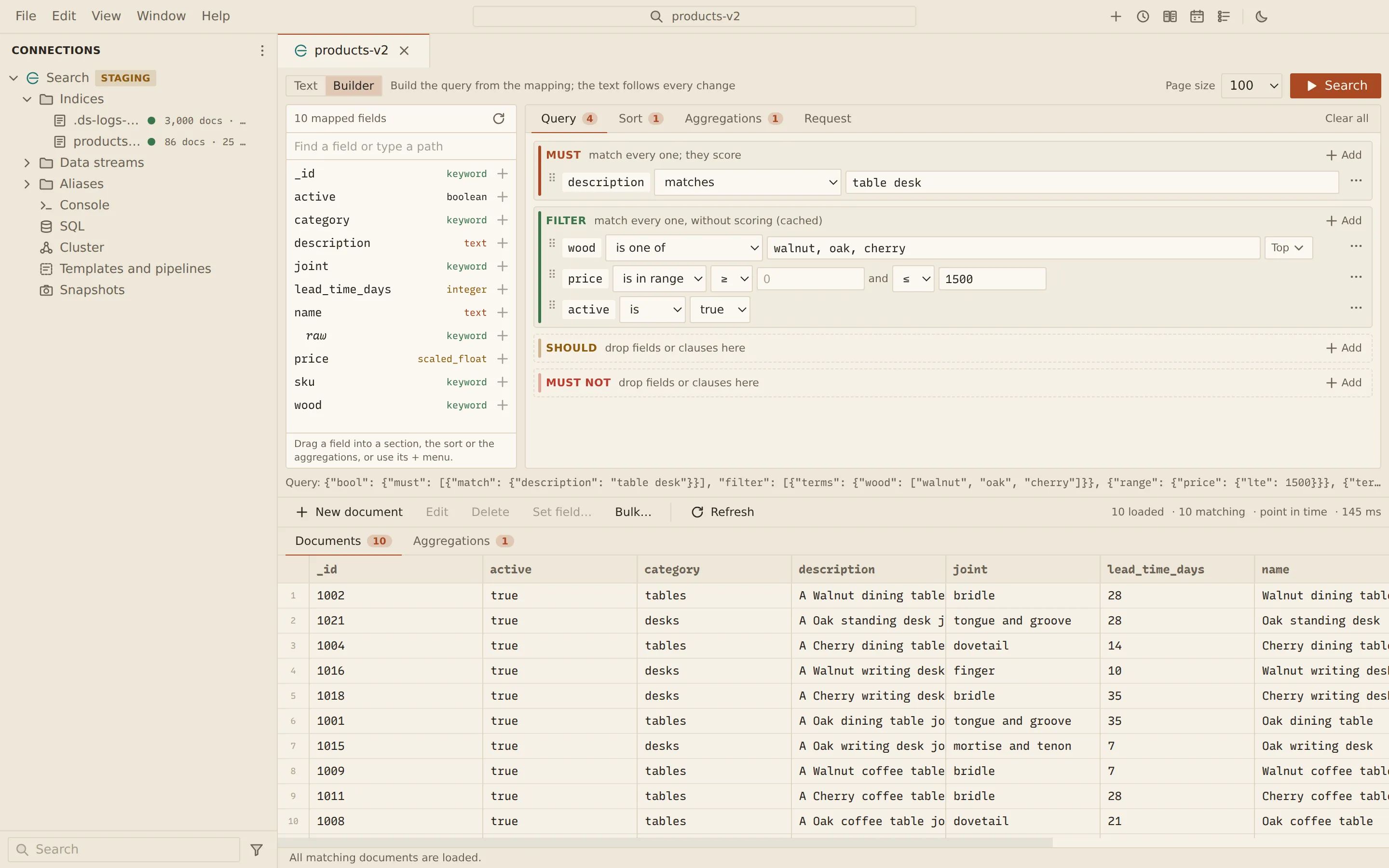
The query builder is the second editor of the documents view’s query bar. It lists the mapped fields of the index, alias or data stream, and builds a bool query, a sort and aggregations from them. Every complete change is written to the bar’s Query DSL text, and text you type in the bar comes back into the builder. It is one query in two editors, not two queries.
Open the builder
Section titled “Open the builder”- Open the document grid of an index, alias or data stream: double-click it in the sidebar, or choose Browse documents from its menu.
- Set the Query editor switch to Builder.
On the left, the field list shows the mapping: each field with its type, nested and object fields
with the fields under them, and multi-fields such as name.keyword.
- Find a field or type a path filters the list. A path that is not in the mapping can be typed here and added too.
- Read the mapping again reloads the list.
The fields come from the mapping of the view’s target. For an alias or a pattern whose indices map a field differently, the first index’s mapping decides; the server’s error shows if a value does not fit another index.
On the right are four tabs, Query, Sort, Aggregations and Request, each with a count of what it holds. Clear all removes every clause, sort key and aggregation.
Build the query
Section titled “Build the query”The Query tab holds the four sections of a bool query:
| Section | What a document needs |
|---|---|
| Must | To match every clause; the clauses score |
| Filter | To match every clause, without scoring (cached) |
| Should | To match at least one clause; when Must or Filter has clauses, none, and a match raises the score |
| Must not | To match none of the clauses |
- Drag a field into a section, or open the field’s + menu (Add field to…) and pick the section under Condition in.
- Pick an operator. The operators offered depend on the field’s mapped type.
- Enter the value.
- Press Enter in the value, or choose Search.
| Operator | Query DSL | Offered for |
|---|---|---|
| matches | match: any of the words |
Text, keyword |
| matches all words | match with "operator": "and" |
Text |
| matches the phrase | match_phrase |
Text |
| starts with the phrase | match_phrase_prefix |
Text |
| matches the Lucene query | query_string |
Text |
| is | term |
Keyword, number, date, boolean, IP |
| is one of | terms |
Keyword, number, date, IP |
| is in range | range |
Keyword, number, date, IP |
| exists | exists |
Every field |
| starts with | prefix |
Text, keyword |
| matches the wildcard | wildcard (* and ?) |
Text, keyword |
| matches the regex | regexp |
Text, keyword |
| is like | fuzzy |
Text, keyword |
| is within | geo_distance |
Geo points |
A path that is not in the mapping is offered every operator except matches the Lucene query.
Values
Section titled “Values”- Values are typed by the mapping and copied as written, so
12345678901234567890on alongfield is never rounded. Double quotes make a string:"42"on a number field is the text 42. - is one of takes values separated by commas. Quote a value that holds a comma.
- is in range takes a lower and an upper bound, each inclusive (≥, ≤) or not (
>,<). Leave one empty for an open range. Date bounds take date math such asnow-7d/d. On a date field, Format, zone… sets the format of the bounds (empty for the field’s format) and their time zone (empty for UTC), such as+01:00orEurope/Berlin. - is within takes a distance such as
10kmand a point aslat,lon.
With is and is one of, on keyword, number, date and IP fields, and on text fields with a keyword multi-field, Top next to the value lists the most common values in the index with their document counts. Pick one to fill in the value, or to add it to the list.
Groups, nested fields and JSON clauses
Section titled “Groups, nested fields and JSON clauses”Each section has an Add menu:
| Item | What it adds |
|---|---|
| Lucene query over every field | A query_string condition on every field, such as status:paid AND total:>100 |
| Group (a bool query of its own) | A group with its own four sections |
| Nested group on path | A nested query on a nested field: one entry must match all of the group |
| Clause written as JSON | Any Query DSL clause, kept as you write it |
A field inside a nested mapping goes into a nested group on its path: adding it creates the group, or uses the one already in that section. A condition on such a field outside a nested group still builds, with a warning, since it matches no document.
When Should has clauses, at least sets minimum_should_match: a number, or a percentage
such as 75%.
Move and remove clauses
Section titled “Move and remove clauses”Drag a clause by its handle to another section, into a group, or before another clause. The clause’s menu has Move to with the other sections of its group, and Remove.
On the Sort tab, drag fields in, or pick one from Add a sort key…. The list also offers _score (relevance) and Written as JSON… for a sort key you write yourself. A field’s + menu has Sort by field too.
- Each key is Ascending or Descending, and puts documents without the field where Missing: default, Missing first or Missing last says.
- Keys sort by the first, then the next. Reorder them by dragging, with the keys Alt + ↑ and Alt + ↓ on a key’s handle, or with the move buttons.
- A text field sorts and aggregates on its keyword multi-field.
Aggregations
Section titled “Aggregations”On the Aggregations tab, drag a field in: keywords group into terms, numbers into stats, dates into a date histogram. A field’s + menu offers the aggregations that suit its type (Aggregate: Terms, for example), and Add an aggregation… lists them all:
| Group | Aggregations |
|---|---|
| Buckets | Terms, Date histogram, Histogram |
| Metrics | Average, Sum, Minimum, Maximum, Stats, Percentiles, Distinct count, Value count |
Written as JSON… adds an aggregation you write yourself.
Each aggregation has a name, made from its type and field (by_status for terms on status),
which you can change. Terms take a top number of buckets, a date histogram an interval
(Minute to Year, or Fixed… such as 30m), and a histogram an interval. Bucket
aggregations take sub-aggregations with + Sub-aggregation….
After a search, the results show on the Aggregations tab beside Documents, as a Tree or a Table.
Request
Section titled “Request”The Request tab shows what Search sends first, as a console request. Paging then adds the size, a tiebreaker sort and a point in time.
GET /orders/_search{ "query": { "bool": { "must": [{ "range": { "total": { "gte": 100, "lt": 200 } } }], "filter": [{ "term": { "status": "paid" } }] } }, "sort": [{ "total": "desc" }], "aggs": { "by_customer_city": { "terms": { "field": "customer.city" } } }}Copy puts it on the clipboard, and Open in console opens it in a console to edit and send.
Text and builder together
Section titled “Text and builder together”In Text mode the bar shows the same search as three texts: Query (DSL clause or Lucene syntax), Sort (JSON) and Aggregations (JSON). In Builder mode the query text shows under the builder.
- Text you type is read back when you switch to the builder. Lucene text becomes a Lucene query condition. A bool query, a nested query and the clauses in the table above are broken down.
- Anything else, such as a
function_score, atermwith a boost or afiltersaggregation, is kept as JSON in its place, editable and kept exactly. Every valid query opens in the builder. - Only text that is not valid JSON stops the builder. It says which part to fix in Text mode, or offers Start over with an empty query.
- While a change is incomplete, such as a condition without a value, the bar keeps the last complete query. The builder shows Not in the query yet with what is missing, and Search asks you to finish it first.
- When the builder writes the text, it writes equivalent forms the short way:
{"term": {"status": {"value": "paid"}}}becomes{"term": {"status": "paid"}}, and a bool with a single Must clause becomes that clause. The text is rewritten only when you change something in the builder.
Related
Section titled “Related”Documents Querybara 0.1.1 · built frombc9f5aa