
Data compare
- PostgreSQL
- MySQL
- MariaDB
Data compare finds the rows that differ between the tables of a source and a target database: rows missing from the target, rows that differ, and rows only in the target. It then writes the statements that make the target match, for you to apply or save as a script.
How rows are compared
Section titled “How rows are compared”Tables pair by name, and each pair needs a primary key or a unique NOT NULL key that both sides
share. Tables without one are listed as not compared, with the reason.
When both sides are the same engine family (PostgreSQL with PostgreSQL, or MySQL and MariaDB with each other), Querybara does not read every row:
- It walks the source table’s key space in ranges of 10,000 rows.
- For each range, each server computes a row count and a checksum of the range itself.
- Ranges whose counts and checksums match are done; no row leaves the server.
- A range that does not match is split in two at the median key of the side with more rows, and each half is checked the same way, until a range holds 1,000 rows or fewer.
- Only those small ranges are streamed from both sides in key order and compared row by row.
Across engine families the text forms of values differ, so checksums are off and every row is streamed and compared as canonical values.
- Data compare walks the key space of the table in ranges of 10,000 rows.
- Each server computes a checksum for each range. Only the checksums travel.
- Ranges whose checksums match are done without reading a single row.
- A range that differs is halved, and halved again, until each part holds at most 1,000 rows.
- Only those rows are streamed from both sides and compared row by row.
- The differences become a sync script of batched DELETE, UPDATE and INSERT statements.
Compare data
Section titled “Compare data”- Choose Compare in the title bar, then Compare data…. Or right-click a connection, a database or a PostgreSQL schema in the sidebar and choose Compare data with…, which fills in the source.
- Pick the Source connection and Source database, and the target’s.
- Open Options and choose which differences to sync and how values compare (see below).
- Choose Compare data.
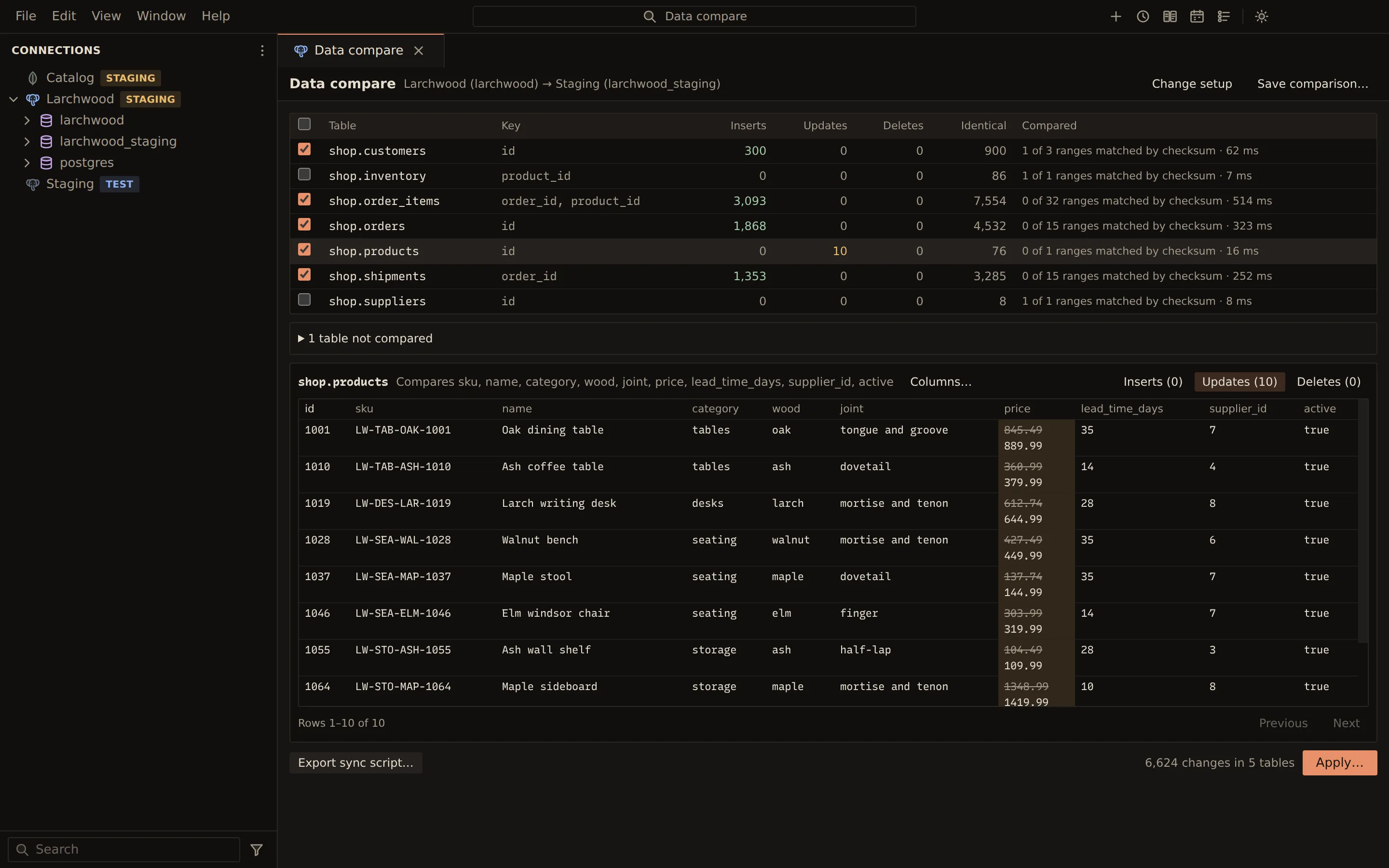
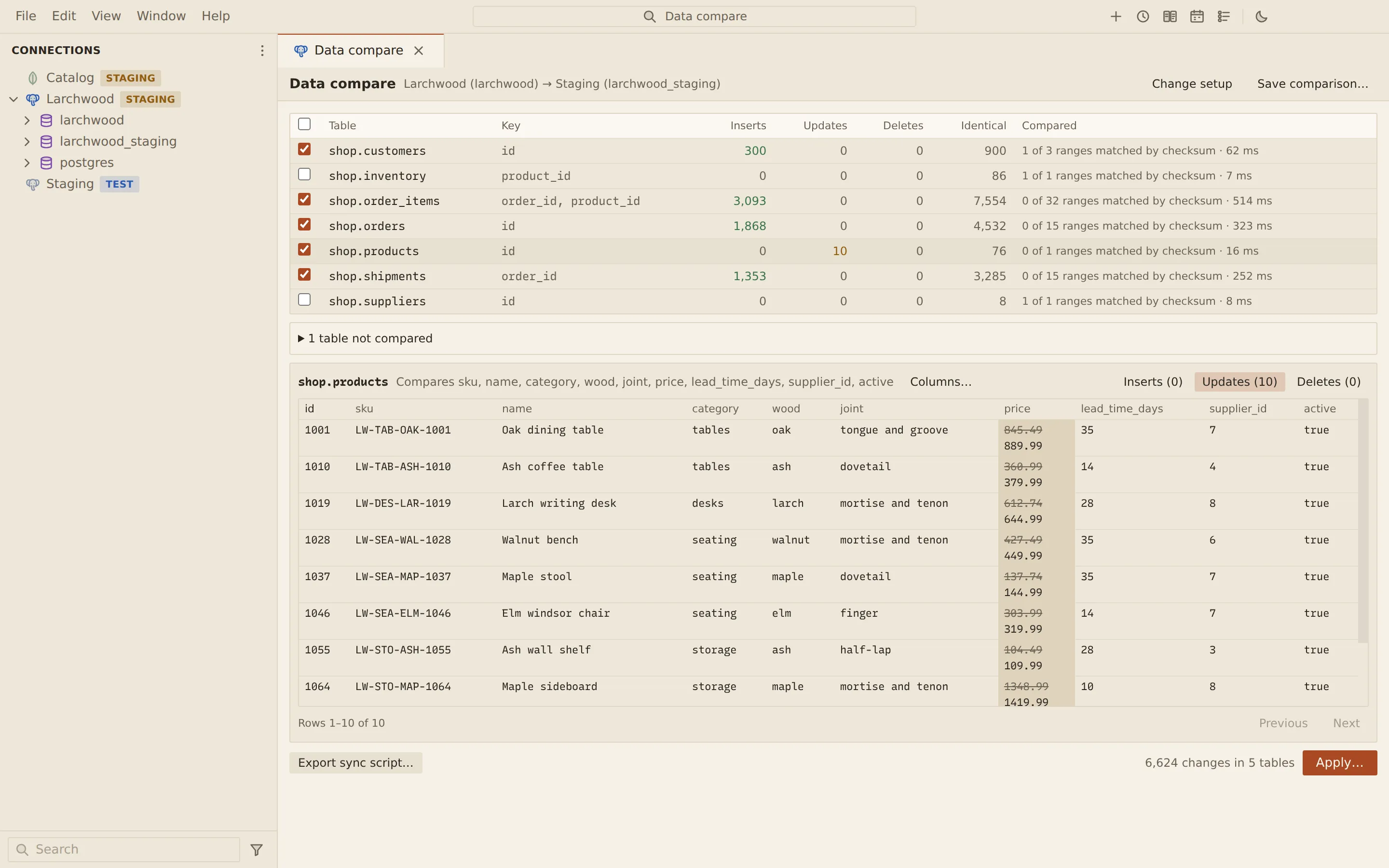
The compare runs as a job, with progress in the Jobs panel. The result lists each table with its key and the counts of Inserts, Updates, Deletes and Identical rows, and how it was compared: how many ranges matched by checksum, or “rows streamed”.
Click a table to page through its differences on the Inserts, Updates and Deletes tabs, with Previous and Next. Inserts show the source row, deletes the target row, and updates both with the changed cells highlighted. Columns… narrows the compared columns of that table for the next compare.
The grid shows the first 10,000 differences per table and action; the counts, the script and the apply cover every row.
Options
Section titled “Options”| Option | What it does |
|---|---|
| Insert rows missing from the target | Includes inserts in the sync |
| Update rows that differ | Includes updates in the sync |
| Delete rows only in the target | Includes deletes in the sync |
| Ignore columns (every table) | Leaves columns such as updated_at out of the compare |
| Float tolerance | Treats floating-point values within this distance as equal |
| Trim text | Compare as is, Trailing spaces (CHAR padding), or Leading and trailing spaces |
| Compare text case-insensitively | Ignores letter case in text |
| Disable foreign key checks while applying | PostgreSQL needs a superuser for this |
| Disable triggers while applying | PostgreSQL; needs table ownership |
Apply or export the changes
Section titled “Apply or export the changes”Tick the tables to sync (or Sync every table), then:
- Export sync script… writes the statements to a file.
- Apply… opens Review and apply the data changes with the target, the script, and how it runs.
Each table’s changes run in their own transaction: deletes first, child tables before their parents, then updates and inserts, parents first. A failing statement rolls its table back and stops; tables before it stay changed. After applying, Querybara compares again and reports whether differences remain.
Saved comparisons work as in structure sync: Save comparison… keeps the connections and data settings. A saved data comparison can run on a schedule; a run that finds differences writes the sync script.
From the command line
Section titled “From the command line”querybara data-compare compares one table. It exits 0 with no differences for the selected actions,
1 with differences, and 2 on errors.
querybara data-compare prod staging --table shop.productsquerybara data-compare prod staging --table shop.products --actions insert,update --out sync.sqlquerybara data-compare prod staging --table shop.products --apply --yesRelated
Section titled “Related”Documents Querybara 0.1.1 · built frombc9f5aa